

NS Analytics
Anyone on the team walks a site with a phone. NS Analytics puts what they measured on a map you can check, share, and export.
NS Analytics pools wireless survey data from many phones into one place. Map cellular and Wi-Fi coverage over a site, a route, or a whole area, look at what the radios actually reported, and export the records into whatever you use next. Teams whose product depends on wireless networks their customers own get the most out of it.
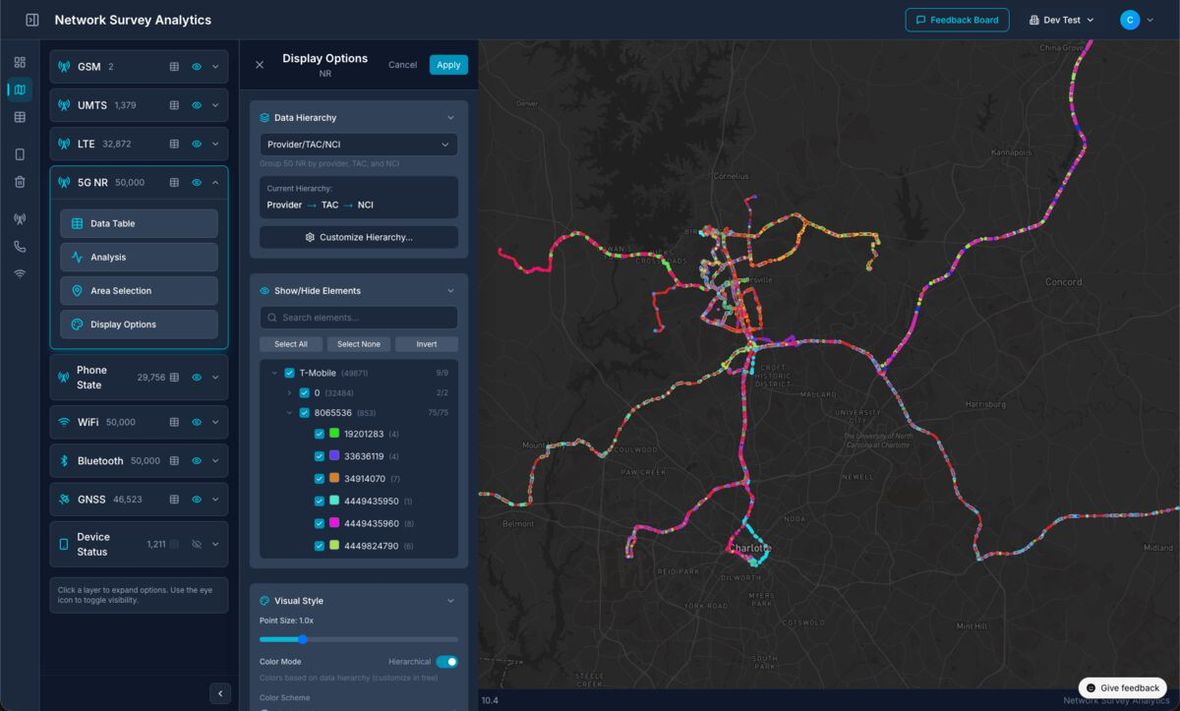
Survey records plotted where they were collected. The layer panel groups them by technology: GSM, CDMA, UMTS, LTE, 5G NR, Wi-Fi, Bluetooth, and GNSS.
How does a site survey work?
-
Step 1
Install the app
Network Survey installs from Google Play on any phone running Android 8.0 or newer. No special hardware.
-
Step 2
Walk the site
Start a survey, go for a walk, stop the survey. No RF background needed.
-
Step 3
Data pools centrally
Surveys from every device and every site land in one place in NS Analytics.
-
Step 4
Read the result
Map the coverage, check the numbers, and export CSV for whatever comes next.
What do you get?
| Capability | Detail |
|---|---|
| Data in | Surveys from the Network Survey Android app, across any number of phones |
| Coverage | Cellular (GSM, CDMA, UMTS, LTE, 5G NR), Wi-Fi, Bluetooth, GNSS |
| Mapping | Survey records on a map, with signal measurements per point |
| Pooling | Many devices and many sites in one place |
| Export | CSV, for your own downstream tools |
| Access | Web app; nothing to install beyond the phone app |
Common questions
Do field staff need RF training?
No. Collecting a survey does not require an RF background: the app records what the radios report, and the analysis happens afterwards in NS Analytics, where whoever needs the answer reads it. Starting a survey is opening the app and tapping one button. Honestly, the hardest part is remembering to press start.
What does it cost?
There is a free tier you can sign up for directly, and paid plans for more data, devices, and users. Pricing is published at networksurvey.app/pricing. For fleet and enterprise deployments, email support@caskfive.com.
Can NS Analytics run on our own infrastructure?
Yes. Self-hosted deployment is available for enterprise. Email support@caskfive.com with what your environment requires.